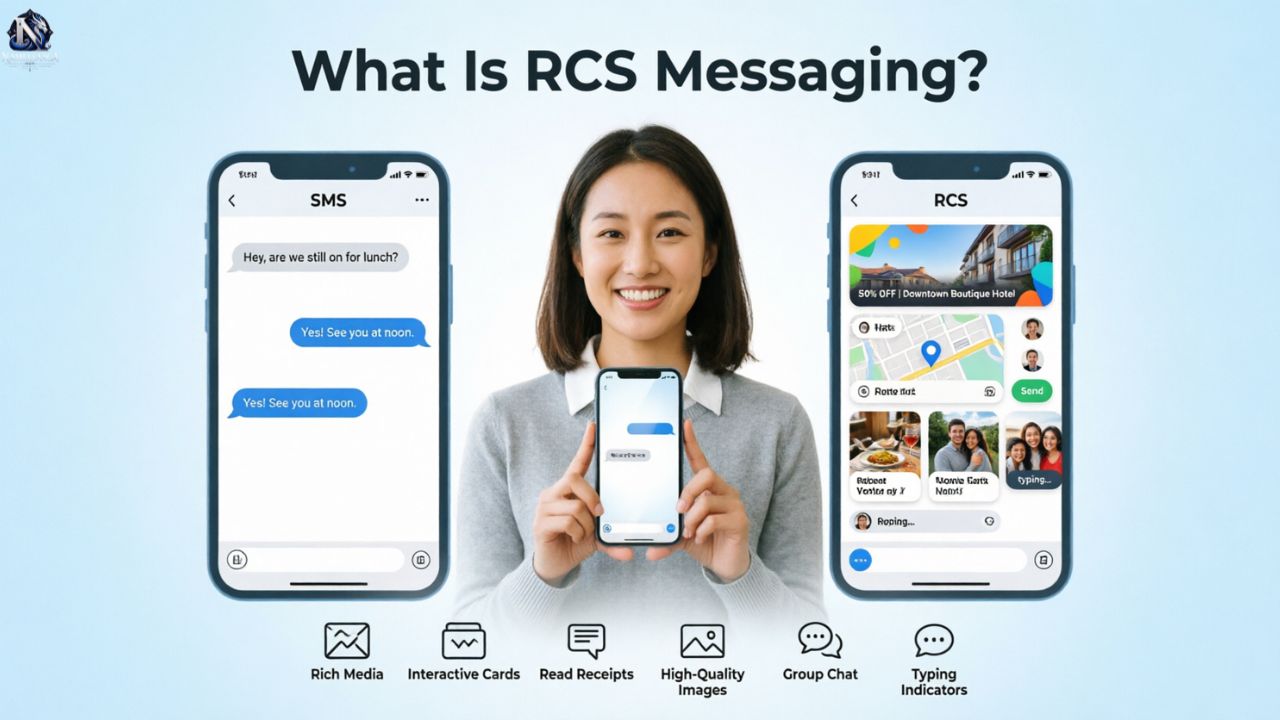
RCS messaging stands for Rich Communication Services. It is a modern messaging standard that adds features such as read receipts, typing indicators, high quality photos, videos, file sharing, reactions, and richer group chats to supported messaging services.
Unlike traditional SMS, RCS generally uses Wi Fi or mobile data. It does not require a separate messaging service such as WhatsApp. On supported phones, the feature works through the phone’s built in messaging app. If RCS is unavailable, the conversation may fall back to SMS or MMS.
What Is RCS Messaging?
RCS is a messaging standard developed through the GSMA to provide a richer experience than traditional SMS and MMS. It is designed to work through supported messaging applications, devices, carriers, and service providers.
Common features can include:
- Read receipts
- Typing indicators
- High quality photos
- Video sharing
- File sharing
- Group chats
- Message reactions
- Rich business messages
- Suggested replies
- Interactive buttons
The GSMA Universal Profile provides a common framework intended to improve interoperability between participating RCS services. This is one reason RCS can support communication across different mobile platforms.
How Does RCS Messaging Work?
RCS works through a compatible messaging application and an internet connection. When you send a message, the messaging service determines whether RCS is available for that conversation.
If the required support is available, the message can use RCS features. These may include richer media, typing indicators, read receipts, and other chat capabilities.
The basic process looks like this:
| Step | What happens |
| 1 | You write a message in a supported messaging app. |
| 2 | The service checks whether RCS is available. |
| 3 | The message is sent through the RCS service. |
| 4 | The recipient receives the message. |
| 5 | Supported chat features become available. |
If RCS cannot be used, the messaging app may offer SMS or MMS instead. This is commonly described as fallback.
For example, imagine Sarah in Chicago sends a photo to David in Houston. If their devices, messaging services, carriers, and connection support RCS, the conversation can use richer messaging features. If RCS is unavailable, the message may use a traditional messaging method instead.
The distance between Chicago and Houston does not determine whether RCS works. Compatibility and service availability matter more.
What Is RCS Chat?
RCS chat is a conversation that uses Rich Communication Services rather than basic SMS or MMS. It can provide a more interactive experience through a supported messaging application.
An RCS chat may show when someone is typing or whether a message has been read. It can also support richer media, reactions, files, and group messaging where available.
The appearance of an RCS conversation can differ between messaging applications. Google Messages and Apple’s Messages app may display settings and features differently.
Read More : How to Tell the Difference Between Poco and Un Poco in Spanish
What Can You Do With RCS Messaging?
RCS lets supported users communicate with richer content instead of relying only on plain text. It can make everyday conversations more similar to modern internet based chat services.
You may be able to:
- Send higher quality photos and videos
- Share supported files
- See typing indicators
- Use read receipts
- React to messages
- Participate in richer group chats
- Share multimedia content
- Use interactive business messaging features
Some business implementations can also support verified sender information, rich cards, suggested replies, and action buttons.
Not every feature is available in every conversation. Your device, messaging application, carrier, country, and recipient can affect what you see.
RCS vs SMS: What’s the Difference?
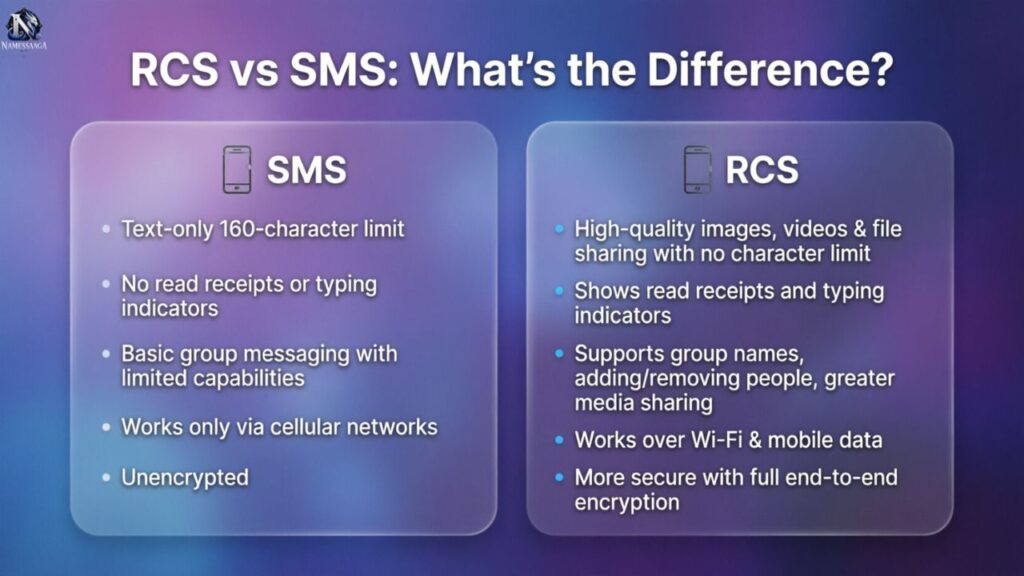
RCS and SMS both support text messaging, but they use different technologies and provide different capabilities.
| Feature | RCS | SMS |
| Connection | Wi Fi or mobile data | Cellular network |
| Read receipts | Supported where available | Not a standard SMS feature |
| Typing indicators | Supported where available | Not a standard SMS feature |
| Rich media | Supported | More limited |
| File sharing | Supported in compatible services | Not a standard SMS feature |
| Group messaging | Supported | Supported with different limitations |
| Internet connection | Normally required | Not normally required |
| Fallback | May fall back to SMS or MMS | Not applicable |
SMS was created for simple text communication over cellular networks. RCS was developed to add richer chat capabilities while keeping messaging integrated into supported phone applications.
One important difference is connectivity. RCS generally relies on an internet connection, while SMS uses the cellular messaging network.
RCS does not eliminate SMS. Traditional messaging remains important because of its broad compatibility, and supported messaging applications can use SMS or MMS when RCS is unavailable.
RCS vs iMessage: What’s the Difference?
RCS is an industry messaging standard. iMessage is Apple’s messaging service designed for supported Apple devices.
RCS can support communication between compatible Android and iPhone users. iMessage is primarily used for conversations between supported Apple devices.
| Feature | RCS | iMessage |
| Type | Messaging standard | Apple messaging service |
| Android support | Yes, where supported | No |
| iPhone support | Yes, where supported | Yes |
| Rich media | Supported | Supported |
| Read receipts | Supported where available | Supported |
| Typing indicators | Supported where available | Supported |
| Encryption | Depends on implementation | End to end encryption is used by iMessage |
When an iPhone user messages an Android user, the conversation can use RCS when the necessary support is available. RCS does not turn the conversation into iMessage.
Apple introduced RCS support for iPhone with iOS 18. Availability still depends on supported software, carrier support, and region.
Does RCS Use Wi Fi or Mobile Data?
RCS normally uses an internet connection through Wi Fi or mobile data. This allows it to transmit richer content than traditional SMS.
If your phone is connected to Wi Fi, supported conversations can use that connection. If Wi Fi is unavailable, mobile data may be used when cellular data is enabled.
Your mobile plan can affect how data usage is handled. RCS itself should not be described as universally free because internet access and carrier plans vary.
The key difference is simple:
- RCS uses internet connectivity.
- SMS uses the cellular messaging network.
- Wi Fi can provide the connection for RCS.
- Mobile data can provide the connection when Wi Fi is unavailable.
- Carrier and service support can affect availability.
For example, if you are using Wi Fi at a café near Pike Place Market in Seattle, an eligible conversation can use that internet connection. If you leave the café and switch to cellular data, RCS can continue using mobile data when supported.
When Will You Get RCS Messaging?
There is no single date when every phone receives RCS. Availability depends on your device, operating system, messaging application, carrier, region, and service configuration.
Many current smartphones support RCS through compatible messaging services. However, a phone being technically capable does not mean every feature will be available in every location.
The recipient also matters. RCS features generally require the necessary support on both sides of the conversation.
RCS Availability in the United States
RCS is widely supported in the United States across compatible Android devices and supported iPhones.
Apple introduced RCS support with iOS 18, allowing compatible iPhone users to use RCS for supported conversations with Android users.
Major U.S. carriers have provided RCS support, but specific features and availability can change. Check your carrier’s current documentation if RCS is missing from your phone.
Which Phones and Messaging Apps Support RCS?
RCS is commonly associated with Google Messages on Android. Device and carrier configurations can affect how the service works.
On iPhone, RCS is available through the Messages app when supported by the iPhone software, carrier, and region.
If RCS is not working, check these areas first:
- Phone software
- Messaging application
- Carrier support
- RCS settings
- Wi Fi or mobile data connection
How to Enable RCS Messaging on Android
On many Android phones using Google Messages, RCS settings are available inside the application.
The exact menu can change with software updates and device configurations. A typical setup is:
- Open Google Messages.
- Open your profile or account menu.
- Select Messages settings.
- Select RCS chats.
- Turn RCS on if the option is available.
- Check the connection status.
If the RCS option is missing, the issue may involve the device, carrier, application, software, or region.
Make sure your phone has an internet connection. If the status remains stuck on connecting, check for software updates and confirm that your carrier supports the service.
How to Enable RCS Messaging on iPhone
Apple added RCS messaging to iPhone with iOS 18. The feature requires a supported carrier and compatible software.
On supported devices, RCS settings can generally be found through the iPhone’s Messages settings.
A typical path is:
- Open Settings.
- Select Apps.
- Select Messages.
- Look for RCS Messaging.
- Turn it on if available.
The exact menu can vary between iOS versions.
If you cannot find the RCS option, check your iOS version and carrier support. A compatible iPhone does not guarantee RCS availability with every carrier or region.
Is RCS Messaging Secure and Encrypted?
There is no single security description that applies identically to every RCS conversation.
Encryption depends on the messaging application, service implementation, and type of conversation. This distinction is important when discussing privacy.
Google states that eligible conversations in Google Messages can use end to end encryption. This does not mean every RCS implementation provides the same protection.
Apple states that RCS messages on iPhone are not end to end encrypted. iMessage uses Apple’s separate end to end encrypted messaging system.
SMS has a different security model and does not provide end to end encryption as a standard feature.
If privacy is important, check the documentation for the specific messaging service you use rather than assuming that all RCS conversations have identical encryption.
Why Did My RCS Message Send as SMS?
Your message may switch from RCS to SMS when enhanced messaging is unavailable for the conversation.
Common reasons include:
- The recipient does not support RCS.
- RCS has been turned off.
- Your phone has lost internet access.
- The carrier does not support the service.
- The messaging application has a connection problem.
- Your phone or SIM configuration has changed.
- RCS service availability has changed.
A phone upgrade can also affect RCS registration. This is worth checking after changing your device, SIM, eSIM, or phone number.
If your messages suddenly send as SMS, first check your RCS status and internet connection. Then review messaging settings, software updates, and carrier support.
How Does RCS Messaging Help Businesses and Marketers?
Businesses can use RCS to send richer customer messages through supported messaging services. Instead of relying only on plain text, companies can combine information with images and interactive features.
Common business uses include:
- Appointment reminders
- Delivery notifications
- Booking confirmations
- Verification messages
- Customer support
- Account updates
- Product information
- Promotional messages
Verified Business Messaging
Some RCS business services can display verified sender information. This can help recipients identify the organization behind a conversation.
Verification features vary by provider, carrier, country, and implementation.
Rich Media and Interactive Features
Businesses can use supported rich media to make messages more informative. Depending on the implementation, a message can contain images, rich cards, suggested replies, or action buttons.
For example, a hotel in Miami Beach could send a booking confirmation containing reservation details and a supported action. A delivery company could provide shipment information and a tracking option.
These examples show how the technology can support practical customer communication without requiring a separate application.
Real Time Updates and Calls to Action
Businesses can use supported RCS services for timely customer updates about appointments, deliveries, reservations, payments, or accounts.
Interactive actions can reduce the number of steps required to respond or access information.
RCS Messaging in 2026: What Should You Know?
RCS has become an important part of modern mobile messaging because it brings richer chat capabilities to supported messaging applications.
Its practical value depends on compatibility. Device software, carrier support, messaging applications, region, internet access, and recipient support can all affect the experience.
For everyday users, the most useful questions are simple:
- Does my phone support RCS?
- Is RCS enabled?
- Does my carrier support it?
- Can the person I am messaging use it?
- Why did my message switch to SMS?
- What security protections apply to this conversation?
Read More : 300+ Guild Names Generator – Cool, Unique, Funny & Fantasy Ideas (2026)
Frequently Asked Questions
What is RCS messaging?
RCS messaging, short for Rich Communication Services, is a modern text standard that replaces SMS in your default messaging app. It sends photos, videos, read receipts, and typing signs over WiFi or mobile data, and falls back to SMS when needed.
What is the difference between RCS and SMS?
SMS is the basic text channel, limited to 160 characters per message. RCS uses the internet to add high quality photos, videos, read receipts, and longer texts. SMS works without data, while RCS needs WiFi or mobile data.
Why does my text message say RCS?
It means your message is going over the internet through RCS, not the old cellular text channel. You usually see this label when an iPhone chats with an Android phone and both sides have RCS active with carrier support.
Why did my RCS message send as SMS?
Your phone could not complete the RCS route, so it used SMS as a backup. Common causes are weak data or WiFi, RCS turned off on either phone, an unsupported carrier, or an old app. The message still arrives, without read receipts.
Is RCS secure and encrypted?
Yes, in supported chats. Google Messages encrypts Android to Android chats end to end. Since iOS 26.5, iPhone to Android chats can be encrypted too, still in beta, with a supported carrier. Look for the lock icon. Business RCS messages are not end to end encrypted.
Is RCS free, and does it use data?
RCS has no separate fee in most plans, but it uses your mobile data or WiFi. On WiFi, it uses none of your bundle. Plain text uses very little data, while photos and videos use more. SMS usually draws from your SMS bundle.
Conclusion
RCS messaging is a modern messaging protocol that adds richer features to traditional SMS. It can support high quality photos, videos, read receipts, typing indicators, group chats, and interactive messages through a compatible messaging app. RCS works over Wi-Fi or mobile data when both sides support the service.
For everyday users, RCS messaging makes texting feel more like a modern chat service while keeping messaging built into supported phones. If RCS is unavailable, a message may fall back to SMS or MMS. Understanding these differences helps you know when RCS is active, what features you can use, and why a message may send as a standard text.

I’m Asma, founder of namessaaga.com, passionate about helping brands and startups discover unique, creative, and memorable names that stand out.