WFH in job posts, emails, or social media, you may wonder what it actually means and how it works. WFH means “work from home,” a work arrangement that lets employees perform their duties outside a traditional office. While it can improve flexibility, reduce commuting, and support work-life balance, it may also create challenges with communication, distractions, isolation, and staying organized.
A successful WFH routine starts with the right setup. A dedicated home office, reliable internet, communication tools, cloud storage, and basic cybersecurity practices can help you stay productive and connected. This guide explains the WFH Meaning, key benefits and challenges, and essential tools you need for effective remote work.
What Does WFH Mean?
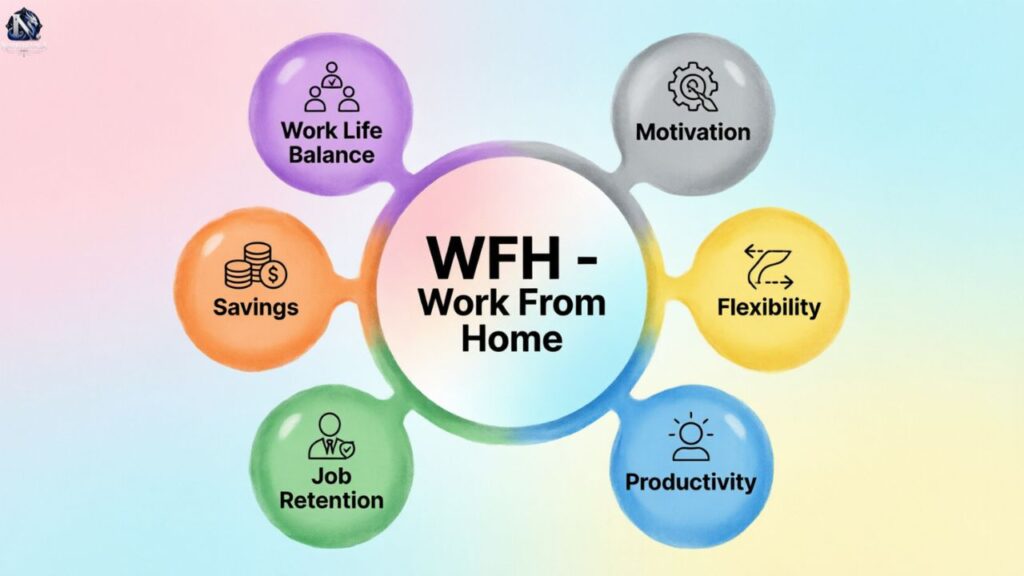
WFH is a workplace abbreviation for work from home. People use it as a daily status (“I’m WFH today”), a job type (“a WFH position”), or a company rule (“our WFH policy”). You say it letter by letter: W-F-H.
Usage grew fast after 2020. According to the Owl Labs 2024 State of Hybrid Work report, 27% of companies run hybrid schedules and 11% operate fully remote. Consequently, working from home now shows up in emails, calendars, and job postings.
What Does WFH Stand For?
WFH stands for “work from home” or “working from home.” Both forms mean the same thing. An employee performs their job duties from a house or apartment, using the internet and digital tools, rather than commuting to a corporate office.
Other meanings exist too. In law, “work for hire” gives the employer the copyright, while “weight for height” tracks child growth in medicine. Still, at work, WFA (work from anywhere) and RTO (return to office) matter more.
WFH vs. Remote Work
WFH ties you to your home address. Remote work is broader, because it also covers coffee shops, coworking spaces, and travel. Therefore, every WFH day counts as remote work, but remote work does not always mean WFH.
Hybrid work splits time between home and the office. Remote-first companies treat the office as optional, while WFA policies let staff work from any location. Meanwhile, tax and legal rules often apply to remote setups abroad, not to home-based ones.
Benefits of Working From Home
The benefits of working from home reach both employees and employers. Workers gain time and control, while companies cut costs and hire more widely. As a result, many firms now keep some form of WFH permanently.
Research backs this up. A 2024 Stanford study, published in Nature, found hybrid employees quit about one-third less often, with no drop in productivity or promotions. Clearly, flexibility pays off when companies manage it well.
Better Work-Life Balance
Skipping the commute gives you time back for family, exercise, and sleep. Moreover, you can handle small personal tasks between meetings. Consequently, many people report lower stress and better work-life balance than in a traditional office.
Balance only lasts with clear limits, though. Without them, work spills into evenings and weekends, and burnout follows. So, set a firm stop time, close your laptop, and protect your family time and your health.
Read More : ONB Meaning in Text: What Does ONB Mean in Chats?
Lower Commuting and Office Costs
The average US commute runs about 27 minutes each way, according to Census Bureau data. Working from home erases that travel, plus fuel, parking, transit fares, and daily lunches. Over a year, those savings add up to thousands of dollars.
Smaller offices mean lower rent, utilities, and supplies, which can shrink overhead significantly. However, companies should still budget for equipment, stipends, and software, since a proper home office setup is never entirely free.
Greater Flexibility and Autonomy
Flexibility lets you work during your most productive hours. Some people focus best at dawn, while others peak in the afternoon. Therefore, a flexible schedule helps you finish tasks faster and with fewer interruptions from office chatter.
Managers judge results instead of hours, and employees own their deliverables. Still, deadlines and team expectations stay the same, so you must clearly communicate when you will be online and available.
Access to a Wider Talent Pool
Companies no longer hire only within commuting distance. Instead, they recruit skilled people across cities, states, and countries. This approach eases skill shortages and helps firms fill hard-to-staff roles faster, so important projects keep moving forward.
A wider talent pool also improves diversity. People with disabilities, caregivers, and rural workers gain access to jobs they might otherwise miss. Consequently, companies often see stronger retention and more varied perspectives on their teams.
Challenges of Working From Home
Working from home does not suit every role, person, or household. Some jobs need hands-on tools, and some homes lack quiet space. Therefore, understanding the downsides helps you plan around them before small problems grow bigger.
Most challenges fall into four groups: employer concerns, employee struggles, communication gaps, and data risks. Next, we break down each one with practical context so you can spot warning signs early and respond quickly and effectively.
Challenges for Employers
Managers must track performance without watching people work. That requires clear goals, regular check-ins, and trust. Meanwhile, onboarding new hires remotely takes extra planning, because newcomers miss casual office learning and valuable cultural cues from colleagues.
Many firms now debate return-to-office (RTO) mandates to rebuild connection, while others refine their WFH policy instead. Additionally, IT support, equipment, and compliance across different regions add cost and complexity.
Challenges for Employees
Without hallway chats, days can feel lonely, and motivation may dip. Moreover, blurred boundaries tempt employees to answer messages late at night, which leads to overwork and fatigue over time.
Children, pets, deliveries, and noisy neighbors interrupt deep work, and small apartments offer little privacy. Consequently, many employees struggle to focus unless they build firm routines and a clearly defined space.
Communication and Collaboration Challenges
Text-based messages often lose tone. A short reply can sound cold, and a joke can sound rude. Therefore, clear writing, emojis where appropriate, and quick video calls help prevent misunderstandings across remote teams and keep projects on track.
Data, Documents, and Privacy Concerns
Home networks usually lack corporate protection. Unsecured Wi-Fi, shared family devices, and phishing emails raise the risk of leaks. IBM’s 2024 Cost of a Data Breach report put the global average at $4.88 million per incident.
Staff may save contracts on personal drives or email files to themselves. Therefore, strong data security rules, access controls, and approved document management systems protect sensitive information and keep companies compliant.
Tips for Working From Home Successfully
Consequently, building a reliable system matters far more than relying on motivation alone, especially during busy weeks.
The five tips below keep working from home sustainable. Each one takes little money and effort, so anyone can try them today. Start with one or two, then add the rest gradually as your routine settles.
Create a Dedicated Workspace
A dedicated workspace also sends a mental signal. When you sit down, your brain switches to work mode, and when you leave, it switches off. Therefore, avoid working from your bed or sofa whenever possible.
Set a Consistent Work Schedule
Fixed start and end times create rhythm. Begin your day with a short routine, such as a walk or breakfast, to replace the commute. Likewise, finish with a closing ritual, like planning tomorrow’s top three tasks.
Share your working hours with teammates, too. A calendar block or Slack status tells colleagues when you are available, which reduces late-night pings. Consistency also helps you meet deadlines calmly, without last-minute stress or rushed work.
Manage Distractions and Breaks
Try time blocking and the Pomodoro technique. Work for 25 focused minutes, then rest for five. Silence notifications during each block, and keep your phone out of reach so deep work actually happens each day.
Breaks matter just as much for energy and health. Stand up, stretch, and look away from your screen every 20 minutes. Furthermore, tell family members your focus hours, so they know when to wait before interrupting.
Stay Connected With Your Team
Over-communicate when you work remotely. Share progress updates, flag blockers early, and confirm important decisions in writing. This habit builds trust quickly and keeps remote collaboration smooth even when teammates sit in different time zones.
Schedule short check-ins, virtual coffee chats, and occasional team meetups. Additionally, turn your camera on for important meetings, because seeing faces strengthens relationships and lowers the isolation many employees feel every day.
Protect Your Data and Privacy
Start with the basics, since most attacks exploit simple mistakes. Use strong, unique passwords, turn on multi-factor authentication, and install software updates promptly. Moreover, connect through your company’s VPN whenever you access internal systems from home.
Separate work and personal devices when possible. Secure your router with a strong password, and avoid public Wi-Fi for sensitive tasks. Finally, follow your WFH policy, and report suspicious emails to your security team immediately.
Essential Tools for Working From Home
The right WFH tools turn a spare room into a functioning workplace. They help teams talk, plan, share files, and meet without friction. Consequently, choosing a small, reliable toolkit beats juggling dozens of overlapping apps.
Prices and features change often, so check each provider’s website before buying. Also, confirm your employer’s approved list to stay compliant with company security rules and policies.
Communication and Collaboration Tools
Slack, Microsoft Teams, and Google Workspace lead this category. They combine instant messaging, channels, file sharing, and integrations in one place. Look for strong search, clear notification controls, and easy connections with your other apps.
Use channels by topic, set status messages, and keep urgent items separate from casual chat. As a result, collaboration tools reduce email overload instead of adding more noise to your day.
Project Management Tools
Asana, Trello, Monday.com, and Jira help teams track tasks, owners, and deadlines. Trello suits simple boards, while Jira fits software teams. Therefore, pick a tool that matches your workflow instead of copying another company’s setup.
These project management tools also support workflow automation, such as approval routing and recurring reminders. Moreover, shared dashboards give managers visibility into progress, which reduces status meetings and builds accountability across remote teams of any size.
Cloud Storage and File Sharing
Google Drive, Dropbox, and OneDrive keep files accessible from any device. They offer version history, so you can restore earlier drafts, and permission settings, so you easily control who views or edits each shared document.
Video Conferencing and Screen Sharing
Zoom, Google Meet, and Microsoft Teams dominate video conferencing. Each supports screen sharing, recordings, and breakout rooms. Choose the one your company already uses, because switching platforms confuses teammates and creates extra security reviews for IT.
Better meetings start with good audio. Use a headset, mute when not speaking, and share an agenda beforehand. Moreover, replace some live calls with short recorded updates, since asynchronous video respects everyone’s different time zones.
Home Office Equipment
Comfort drives productivity. An ergonomic chair, an adjustable desk, an external monitor, a webcam, and a noise-canceling headset form a solid base. Additionally, a reliable internet plan of at least 25 Mbps supports video calls smoothly.
A good chair and headset deliver the biggest gains, while premium monitors and standing desks can wait. Also, ask your employer about stipends, since many companies reimburse home office purchases.
Read More : ISTG Meaning: What Does ISTG Mean in Text, TikTok, and Social Media?
Frequently Asked questions
What does WFH mean in a text or email?
It means “work from home.” People use it to tell colleagues they are working from their residence and will respond online instead of the office.
Is WFH the same as remote work?
Not exactly. WFH means working from home, while remote work also includes cafes, coworking spaces, and travel. So WFH is one type of remote work.
What does WFH stand for besides “work from home”?
In law, it can mean “work for hire,” where employers own the copyright. Medicine uses “weight for height” as a standard child growth measure today.
What is the difference between WFH and WFA?
WFH strictly limits you to your own residence. WFA, or work from anywhere, lets you choose any location, subject to company, tax, and legal rules.
What tools do I need to work from home?
You need reliable internet, a laptop, a headset, and a chat tool like Slack or Teams. Add project management, cloud storage, and video call software.
Conclusion
WFH Meaning helps you see how working from home has changed the way people manage their jobs. WFH stands for “work from home” and allows employees to complete their work outside a traditional office. It can offer better flexibility, less commuting, and improved work-life balance, but it can also bring distractions, isolation, and communication challenges.
A successful WFH setup depends on the right habits and tools. A dedicated workspace, clear schedule, reliable communication apps, secure file storage, and good privacy practices can make remote work easier. Whether you work from home every day or follow a hybrid schedule, understanding the benefits, challenges, and practical requirements can help you build a productive and sustainable routine.

I’m Asma, founder of namessaaga.com, passionate about helping brands and startups discover unique, creative, and memorable names that stand out.